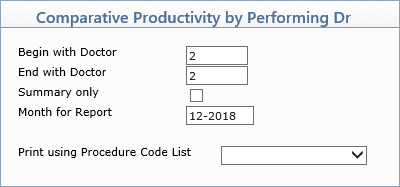
| Prompt | Response | Req | Len |
|---|---|---|---|
| Begin with Performing Doctor | Type the code you want to start with or leave the text box blank to start with the first code in the table. | 6 | |
| End with Performing Doctor | Type the code you want to end with or leave the text box blank to end with the last code in the table. | 6 | |
| Summary only | If you only want to print a summary, select this check box. If you do NOT select Summary Only, the report will include the individual adjustment codes and amounts. | 1 | |
| Month for Report | Type the month you want to generate the report for in the format of MM-YYYY. | 7 | |
| Print using Procedure Code List | If you did NOT select the Summary Only check box, you can select to print this report based on a previously defined Procedure Code List. | 20 |
Copyright and Trademark Notice. Copyright © 2019 CompuGroup Medical, Inc. CGM®, CompuGroup Medical® and the CGM logo are registered trademarks and CGM webPRACTICE™ and CGM webTOOLS™ are trademarks of CompuGroup Medical AG in the United States and/or other countries. Any rights not expressly granted herein are reserved.