
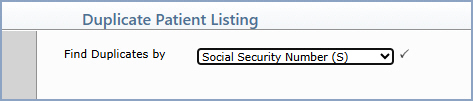
| Prompt | Response | Req | Len |
|---|---|---|---|
| Find Duplicates by | Select the data element used to identify duplicate patient accounts: Social Security Number, Date of Birth and Last Name, Primary Policy Number, or Patient Identifier. |  |
Copyright and Trademark Notice. Copyright © 2019 CompuGroup Medical, Inc. CGM®, CompuGroup Medical® and the CGM logo are registered trademarks and CGM webPRACTICE™ and CGM webTOOLS™ are trademarks of CompuGroup Medical AG in the United States and/or other countries. Any rights not expressly granted herein are reserved.
