

| Prompt | Response | Req | Len |
|---|---|---|---|
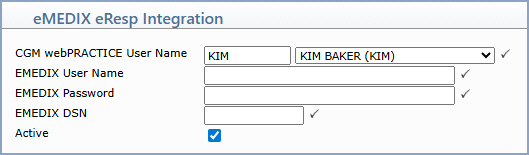
| CGM webPRACTICE User Name | Type or select the CGM webPRACTICE user code that this eMEDIX account belongs to. The user's printing name displays to the right of the field. For the database account row, this field is not populated. |  |
10 |
| eMEDIX User Name | Type the user's corresponding eMEDIX user name as assigned by eMEDIX. | |
30 |
| eMEDIX Password | Type the user's password as assigned by eMEDIX. | |
30 |
| eMEDIX DSN | Type the DSN assigned by eMEDIX. | |
10 |
| Active | Selected by default. Clear this check box if you want to deactivate the account so the user will no longer have access to eMEDIX eResp. |
Copyright and Trademark Notice. Copyright © 2019 CompuGroup Medical, Inc. CGM®, CompuGroup Medical® and the CGM logo are registered trademarks and CGM webPRACTICE™ and CGM webTOOLS™ are trademarks of CompuGroup Medical AG in the United States and/or other countries. Any rights not expressly granted herein are reserved.
