
| Prompt | Response | Req | Len |
|---|---|---|---|
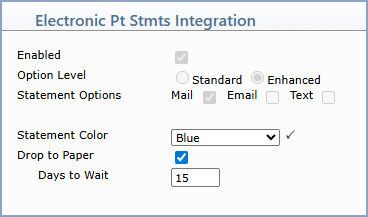
| Enabled | Displays whether electronic patient statements have been activated for this database. This field is set automatically when the database is activated for electronic patient statements and is informational only. Contact your Implementation consultant if any changes are needed. | 1 | |
| Option Level | Displays the level of electronic statement options activated for this database — Standard or Enhanced. This field is set automatically when the database is activated for electronic patient statements and is informational only. Contact your Implementation consultant if any changes are needed. | 1 | |
| Statement Options | Displays the statement delivery methods (Mail, Email, Text) that have been activated for this database by your Implementation consultant. These options control which delivery methods are available and automatically default in patient accounts. Do not deselect these options, as doing so will make those delivery methods unavailable when registering patients. Contact your Implementation consultant if any changes are needed. | ||
| Statement Color | If Enhanced options are activated, you can select the color you want for electronic patient statements. The default color is Blue. The other color options are Green, Red, or Black and White. | Y | |
| Drop to Paper | If Enhanced options are activated, select this check box if you want a paper statement sent when an Email and/or Text statement is not accessed by a patient within a specified number of days. | 1 | |
| Days to Wait | If Enhanced options are activated, type the number of days to wait before sending a paper statement to a patient who has not accessed their Email or Text statement. This field is required if the Drop to Paper check box is selected. |
Copyright and Trademark Notice. Copyright © 2019 CompuGroup Medical, Inc. CGM®, CompuGroup Medical® and the CGM logo are registered trademarks and CGM webPRACTICE™ and CGM webTOOLS™ are trademarks of CompuGroup Medical AG in the United States and/or other countries. Any rights not expressly granted herein are reserved.
