
Patient Look-Up Integration

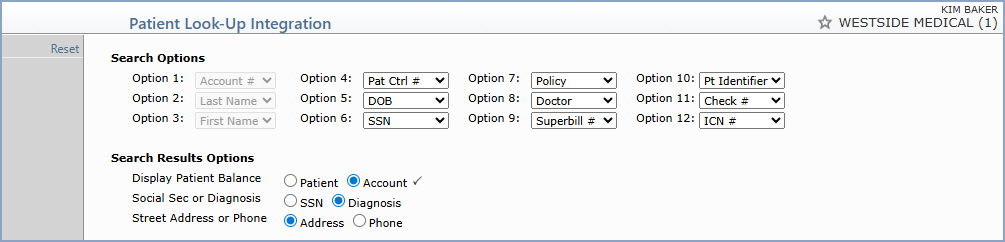
With the Patient Look-Up Integration function, you can customize which search options are available on the Patient Look-Up screens throughout the system and determine the order in which they display. You can also control which information is displayed in the search results.


NOTE: The Patient Look-Up Integration settings are stored by database. The integration applies to three Patient Look-Up screens within the system: Patient Look-Up in Scheduling, Patient Look-Up in Reactivate/Inactive Patient, and Patient Look-Up in other areas of the system. These changes do not apply to the Patient Look-Up screen in the Patient Referral Menu.

Search Options

The Search Options section provides 12 numbered slots that determine which fields appear on the Patient Look-Up screens and in what order. The first three options are fixed and cannot be changed:

Options 4 through 12 are customizable. Select the search field you want for each slot from the corresponding drop-down list. Available search fields include Pat Ctrl #, DOB, SSN, Policy, Doctor, Superbill #, Pt Identifier, Check #, ICN #, and others.

NOTE: If you select Pat Ctrl # (Patient Control Number) as a search option, the Pat Ctrl # can be entered on the Patient Look-Up screens in any of the following formats:

Search Results Options

The Search Results Options section controls which additional information is displayed for each row in the Patient Look-Up search results.

Data Field Information – Search Results Options
Prompt Response Req Len
Display Patient Balance Select Patient to display each patient's individual balance in the search results, or Account to display the account balance.  
Social Sec or Diagnosis Select SSN to display the patient's Social Security Number in the search results, or Diagnosis to display the patient's primary diagnosis.    
Street Address or Phone Select Address to display the patient's street address in the search results, or Phone to display the patient's phone number.    

Action Column Functions

Reset - Restores the Search Options and Search Results Options to their default settings.
