Reports Integration
With the Reports Integration function, you can control whether
patients' Social Security Numbers (SSNs) are asterisk-filled or printed
in full on the following reports:
- Duplicate Patient Listing
- Patient Detail to Excel
- Print Appointment Schedule
- Print Appointment Schedule to Excel
- Print Scheduled Patient Detail to Excel
- Transaction Detail to Excel
When you access the function, a listing of the available reports displays
along with the current Asterisk Fill SSN setting for each report.
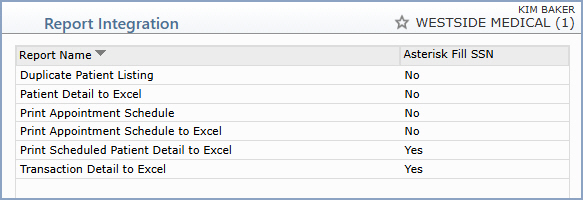
To change a setting, click the report in the list. A detail screen
displays with the Asterisk Fill SSN check box. Clear the check
box to print the full SSN on the report, or select the check box to
asterisk-fill the SSN.
NOTE: By default, the Asterisk Fill SSN check box is
selected for all reports listed above. If your system has a
customization in place to show SSNs, that customization overrides the
default. If you print any of the reports listed above and the SSN field
does not behave as expected, contact Customer Service.

