
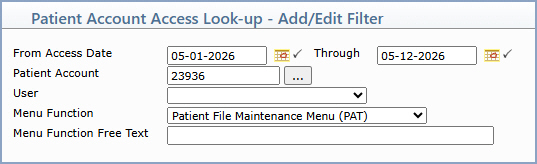
| Prompt | Response | Req | Len |
|---|---|---|---|
| From Access Date | Type the date you want the search to begin or click the calendar icon to select a date. | Y | 10 |
| Through | Type the date you want the search to end or click the calendar icon to select a date. | Y | 10 |
| Patient Account | Type the patient account number or click the lookup button to search for an account. | 6 | |
| User | Select the user you want to filter on from the list. | 1 | |
| Menu Function | Select the top-level menu function you want to filter on from the list. | 1 | |
| Menu Function Free Text | Type all or part of a specific menu function name to filter on. | 30 |

Copyright and Trademark Notice. Copyright © 2019 CompuGroup Medical, Inc. CGM®, CompuGroup Medical® and the CGM logo are registered trademarks and CGM webPRACTICE™ and CGM webTOOLS™ are trademarks of CompuGroup Medical AG in the United States and/or other countries. Any rights not expressly granted herein are reserved.
