ERA Activity Log
With the ERA Activity Log function you can monitor the activity of
your electronic remit files. The log records the date, time, and user
associated with each activity performed on a file, along with other relevant
data for each ERA file. A separate entry is recorded for each activity,
so a single file may appear in the log multiple times.
Upon accessing the function, a default filter for the last 60 days of activity
is automatically applied. All columns are sortable; click any column heading
to sort by that column.
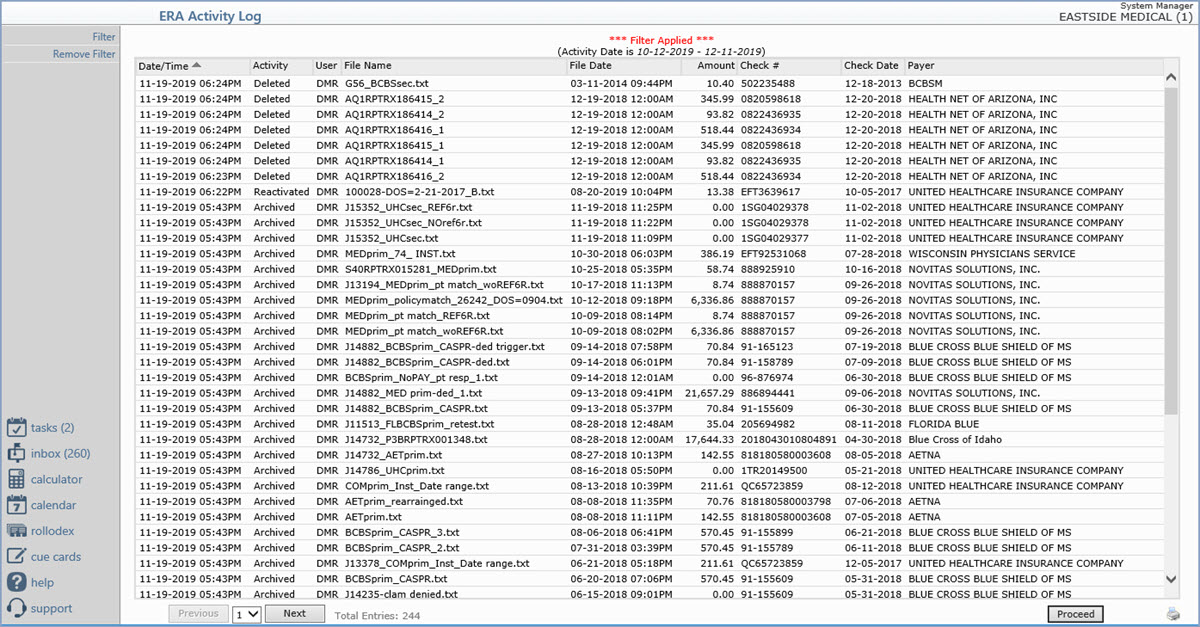
Files in black font are unposted archived files. Files in gray
font are posted files.
Columns
- Date/Time — The date and time the activity occurred. For
the Created activity, this is the date the remit file was originally received.
For other activities, this is the actual date and time the activity was
performed.
- Activity — The action recorded for the file. See Activity
Values below.
- User — The User code of the user who performed the activity.
For system-generated activities (such as Created), the User column populates
with CGM.
- File Name — The remit file name.
- File Date — The original date the remit file was received.
- Amount — The total check amount on the remit file.
- Check # — The check or EFT number from the remit.
- Check Date — The check date from the remit.
- Payer — The name of the insurance carrier that sent the
remit.
Activity Values
- Created — The remit file was received and is available
to post in the Import and Post
ERA Files screen.
- Posted — The remit file was posted.
- Archived — The remit file was moved to the Archived ERA
Files screen.
- Reactivated — A previously archived file was moved back
to the active view so it can be posted or re-posted.
- Deleted — The remit file was permanently deleted.
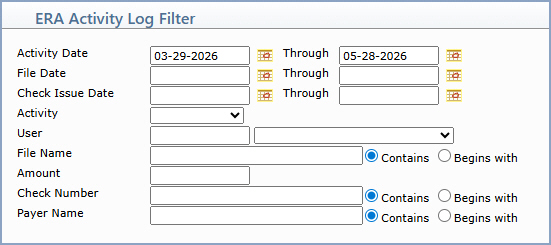
You can change or remove the default filter as needed using the Add/Edit
Filter and Remove Filter Action Column buttons. Filter by Activity
Date, File Date, or Check Issue Date ranges; by Activity type; by User;
or by File Name, Amount, Check Number, or Payer Name. The free-text filter
fields offer Contains and Begins with matching options.