
| Prompt | Response | Req | Len |
|---|---|---|---|
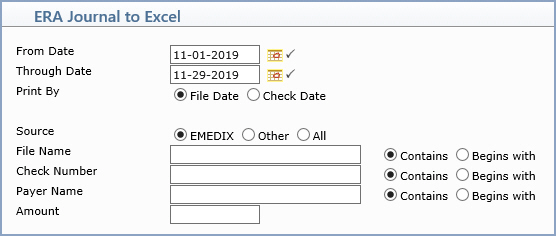
| From Date | Type the date you want the report to start with or click the calendar icon to select a date. |  |
10 |
| Through Date | Type the date you want the report to end with or click the calendar icon to select a date. | |
10 |
| Print By | Select File Date to print the report based on the date the remit file was received, or select Check Date to print the report based on the check date from the remit. | ||
| Source | Select EMEDIX to include only remits imported from eMEDIX, Other to include only remits imported through a direct path (other than eMEDIX), or All to include every remit regardless of source. | ||
| File Name | Type all or part of a remit file name to limit the report to matching files. Select Contains to match files whose name contains the entered text anywhere, or Begins with to match only files whose name starts with the entered text. | 50 | |
| Check Number | Type all or part of a check or EFT number to limit the report to matching remits. Select Contains or Begins with to control how the text is matched. | 20 | |
| Payer Name | Type all or part of an insurance carrier name to limit the report to matching remits. Select Contains or Begins with to control how the text is matched. | 50 | |
| Amount | Type a check amount to limit the report to remits with that exact amount. | 10 |
Copyright and Trademark Notice. Copyright © 2019 CompuGroup Medical, Inc. CGM®, CompuGroup Medical® and the CGM logo are registered trademarks and CGM webPRACTICE™ and CGM webTOOLS™ are trademarks of CompuGroup Medical AG in the United States and/or other countries. Any rights not expressly granted herein are reserved.
