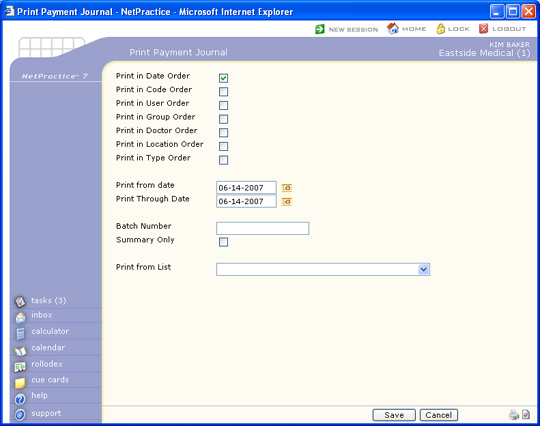
| Prompt | Response | Req | Len |
|---|---|---|---|
| Print in Date Order | If you want to print the report in date order, select this check box. If you select multiple sorting options, a separate report will be generated for each option. | 1 | |
| Print in Code Order | If you want to print the report in payment code order, select this check box. If you select multiple sorting options, a separate report will be generated for each option. | 1 | |
| Print in User Order | If you want to print the report in user order, select this check box. If you select multiple sorting options, a separate report will be generated for each option. | 1 | |
| Print in Group Order | If you want to print the report in billing group order, select this check box. If you select multiple sorting options, a separate report will be generated for each option. | 1 | |
| Print in Doctor Order | If you want to print the report in performing doctor order, select this check box. If you select multiple sorting options, a separate report will be generated for each option. | 1 | |
| Print in Location Order | If you want to print the report in location order, select this check box. If you select multiple sorting options, a separate report will be generated for each option. | 1 | |
| Print in Type Order | If you want to print the report in type of service order, select this check box. If you select multiple sorting options, a separate report will be generated for each option. | 1 | |
| Print By | Select Accounting Date to print the report based on the accounting date of each payment, or select Service Date to print the report based on the service date of each payment. | ||
| Print From date | Type the date you want the report to start with or click the calendar icon to select a date. | 10 | |
| Print Through Date | Type the date you want the report to end with or click the calendar icon to select a date. | 10 | |
| Batch Number | Type a batch number to print only the transactions within that batch, type '0' to print all non-batched transactions, or leave blank to print all transactions. Click the magnifying glass icon to display the available batches. | 17 | |
| Default Last Batch | Select this check box to have the last Batch Number used automatically populate in the Batch Number field. | 1 | |
| Summary Only | If you only want to print a summary, select this check box. | 1 | |
| Print from List | If you want to print this report based only on the patients contained in a previously defined DMS List, select the list you want to use. For example, if you want a report only for Medicare patients, you first create a list of all your Medicare patients, then print the Payment Journal and select the Medicare patient list you just created for 'Print from List'. | 20 |
Copyright and Trademark Notice. Copyright © 2019 CompuGroup Medical, Inc. CGM®, CompuGroup Medical® and the CGM logo are registered trademarks and CGM webPRACTICE™ and CGM webTOOLS™ are trademarks of CompuGroup Medical AG in the United States and/or other countries. Any rights not expressly granted herein are reserved.