
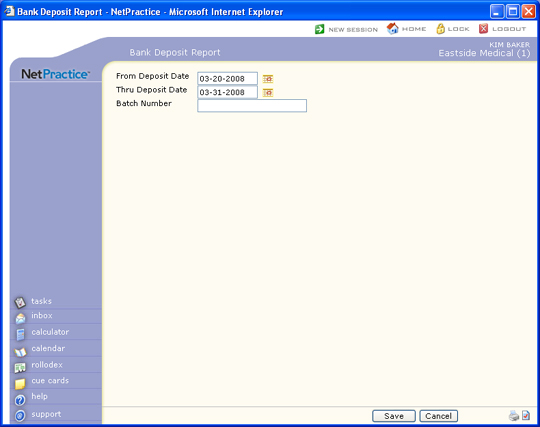
| Prompt | Response | Req | Len |
|---|---|---|---|
| From Deposit Date | Type the date you want the report to start with or click the calendar icon to select a date. | 10 | |
| Thru Deposit Date | Type the date you want the report to end with or click the calendar icon to select a date. | 10 | |
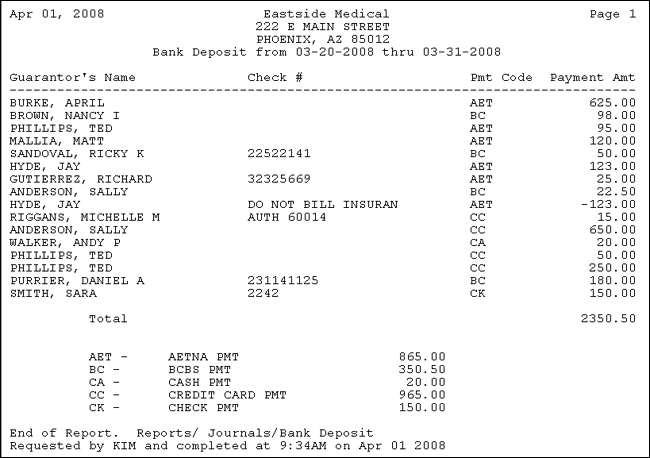
| Include Check # Breakdown | If you want the individual check numbers to print for each payment code in the Summary section, select this check box. | 1 | |
| Batch Number | Type the code you want or click the magnifying glass to search a list of every 'unlocked' batch. You can also create a new batch by typing in a batch number that does not exist and you will be asked if you want to create it. |
17 | |
| Default Last Batch | If you want the last batch number (used by the current user, in the current database, for the current date) to default, select this check box. If you select this check box while in any function in the system that contains a Batch Number field and then you access a different function that contains a Batch Number field, the Batch Number field will automatically default the last batch number used. |
Copyright and Trademark Notice. Copyright © 2019 CompuGroup Medical, Inc. CGM®, CompuGroup Medical® and the CGM logo are registered trademarks and CGM webPRACTICE™ and CGM webTOOLS™ are trademarks of CompuGroup Medical AG in the United States and/or other countries. Any rights not expressly granted herein are reserved.
