Interface Charge Reconciliation Report

The Interface Charge Reconciliation Report provides a means to reconcile the charges that are sent from an inbound interface to CGM webPRACTICE, to ensure they are all received.

A comparison is made of the Inbound Charge Messages Journal stored in your interface to the charges received in CGM webPRACTICE. All inbound charge messages are stored in CGM webPRACTICE as Unposted Procedures or to unregistered new patient accounts that are assigned temporary account numbers. The report attempts to match the Procedure Code and Service Date for each inbound charge message to 'like' charges for patients within CGM webPRACTICE.

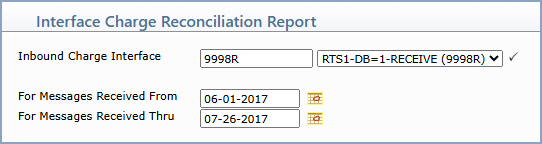
Upon accessing this function, type or select the Inbound Charge Interface and the date range for the message results you want the report to print. Click Save, then select a printer.


Data Field Information
Prompt Response Req Len
Inbound Charge Interface Type the interface code or select from the Inbound Charge Interface list. 5
For Messages Received From Type the start date for the message results you want the report to include, or click the calendar icon to select a date.   10
For Messages Received Thru Type the end date for the message results you want the report to include, or click the calendar icon to select a date.   10

Sample Report

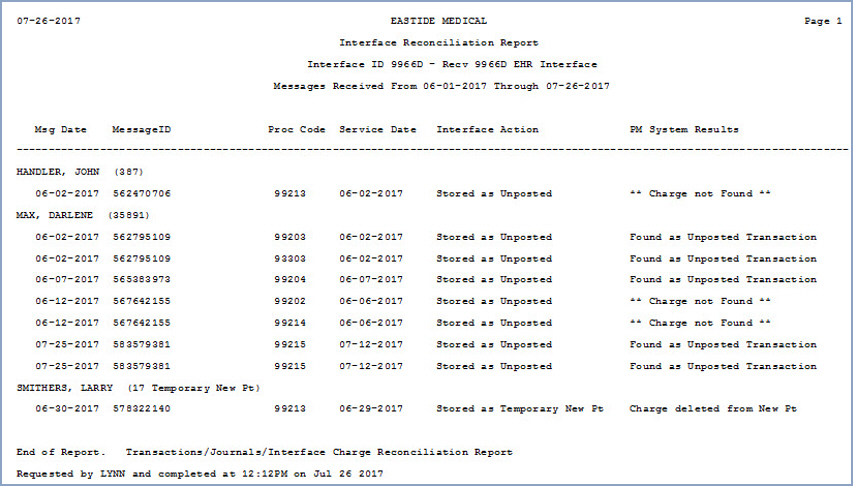
The report includes the patient name, account number (or temporary new patient account number), inbound charge message date and ID number, procedure code, service date, the action performed by the interface, and the search result found within CGM webPRACTICE.


Notes: The following reconciliation results are only provided for inbound charge messages received after this report has been installed.

For the original PDF reference document, see Interface Charge Reconciliation Report.