Allocating Open Credit Payments
There are times when you leave payments unallocated or unapplied. You
may be posting a payment to an account and the charge that you want to
apply the payment to, is not yet posted. Or you may have gotten an insurance
payment but you don't have the dates of service on record for the patient.
Whatever the reason, when you have the information necessary or the posting
completed needed for the payment, you can then apply that previously left
unallocated payment.
To apply an open credit you need to complete the Payment Entry screen as
follows:
- Use the current accounting date. Even if the payment that was left
unallocated is in a prior month, you still use a current accounting
date to apply open credits.
- Enter the payment amount as a zero.
- Use the same payment code that the original payment that was left
unallocated had.
- In the Remarks field we suggest using something descriptive that
lets you know in the future when reviewing the account, what you did.
- Enter the insurance carrier code if it is an insurance or copayment.
- Enter the date of service if known.
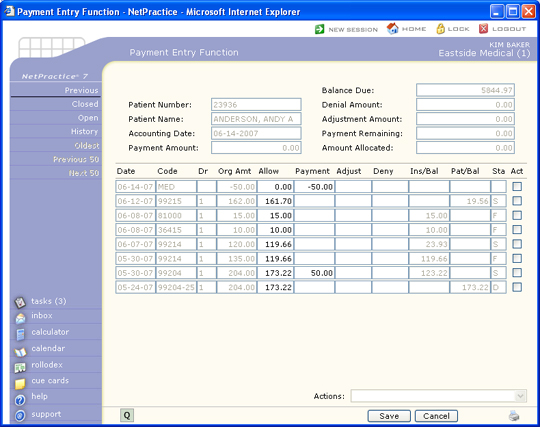
Click Save once you have completed the payment
entry screen, otherwise click Cancel to exit this function. You
will notice that on the top portion of the screen, payment amount, amount
allocated, and payment remaining are all zeros.
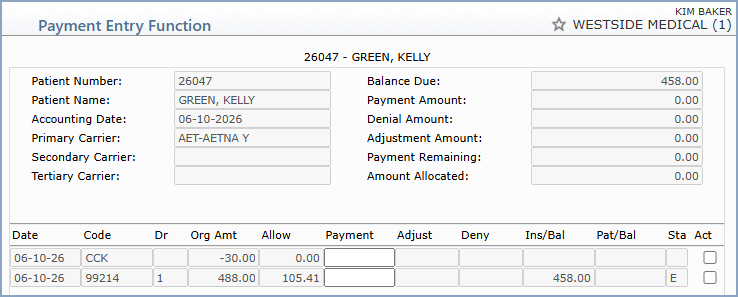
In order to apply an open credit, you must first pick up the credit you
want to apply.
Position the pointer in the Payment field and enter the
amount of the credit you want to apply. You will enter this as a negative
amount. If the original payment that was left unallocated was an insurance
payment, then to reapply the payment you must also use an insurance payment.
The same will hold true if it is a co-payment or a personal payment. If
you try and pick up a line item that has a different payment type, a dialogue
box will pop up to let you know the payment type differs. Click OK to acknowledge the message.
Once you press TAB you will notice that your payment amount on the top
of your screen now has the amount you just entered as a postive amount.
Now you have money to work with and you can start applying as if you were
entering a payment from the beginning.
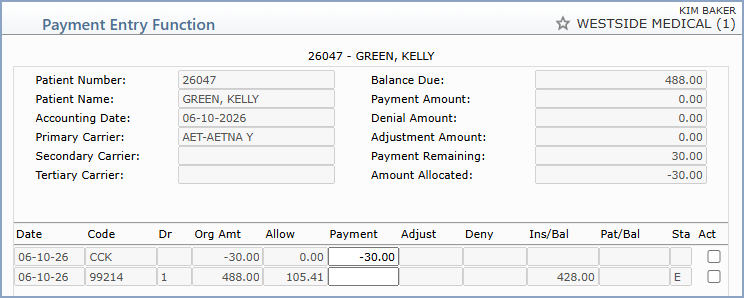
You can pick up multiple open payments in one session. You can utilize
the action items while applying open credits as well.
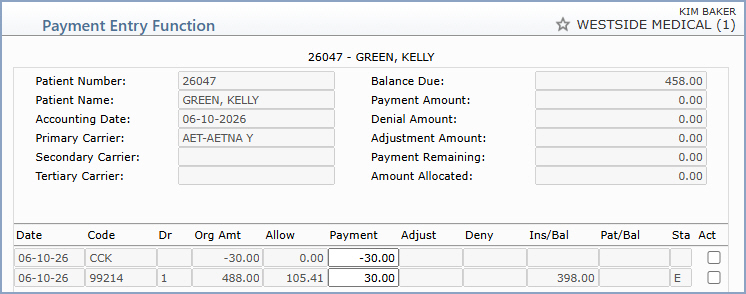
When you are finished allocating the payment, click Save,
otherwise click Cancel
to exit this function.
When this payment is posted, the amount of the line items paid in the course
of the payment allocation, will now be reflected in the payment analysis.
The doctor on each line item paid will now get credit for the payment
that had been previously left unallocated.

