Posting Other Types of Payments
The entry of negative payments and adjustments can also be accomplished
through payment entry. Negative payments can be used to process insurance
recoupments, correct posting errors or to deallocate payments. You cannot
mix regular payments and negative payments. When you want to enter a negative
payment, you must enter a negative payment amount in the payment entry
screen.
Processing Insurance Recoupments
When an insurance company issues a payment for one patient and at the same
time deducts a portion of that payment to cover a refund owed for a different
patient, it is called a recoupment. The insurance company has recouped
a refund owed to them by deducting it from your payment. This allows the
insurance company to get their money more quickly from you by not having
to issue a refund request to your office. When they do a recoupment it
does force you to take a few extra steps to properly post the payment
and recoupment.
You will need to review the patient account the refund is being recouped
for prior to posting the recoupment. You will need to make a note if any
contractual adjustment was made when the payment was originally posted.
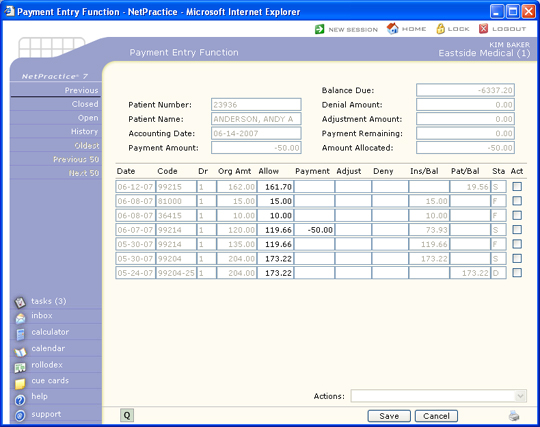
Select the patient account the refund is being recouped from and then complete
the payment fields as shown.
- Use the current accounting date that was used for the EOB.
- Enter the payment amount as a negative amount (-50.00)
- Use the same payment code that was posted on the original payment
- In the Remarks field we suggest using 'recoup dos =XX-XX-202X'
- Select the insurance carrier code
- Enter the Date of Service if known
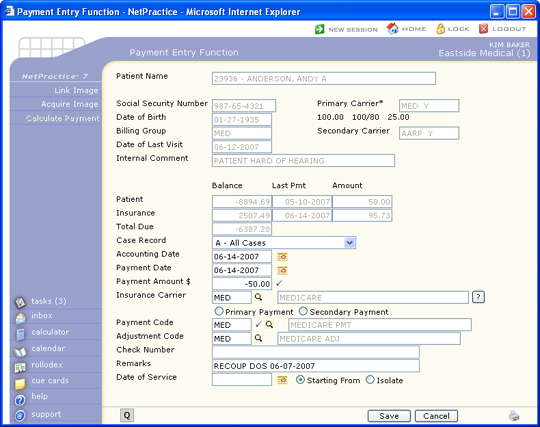
Click Save once you have completed these fields to proceed to the
Payment Allocation screen, otherwise click Cancel to exit this
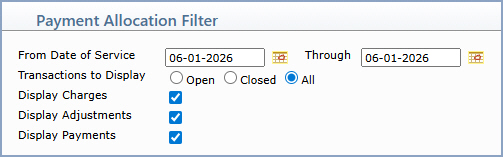
function. If the original charge line item does not show up, click Add/Edit
Filter, set Transactions to Display to Closed or All, type in the
Date of Service and click Save. Any line items for that date of
service should now be displayed.
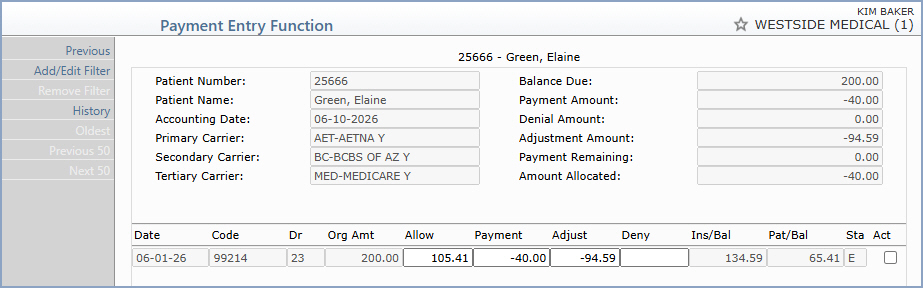
If there are multiple line items, select the correct one and type in the
negative payment amount to be applied in the Payment field. You can only
apply a negative payment towards a charge. If there is a corresponding
contractual adjustment, enter the adjustment portion as a negative amount
as well.
Note: Negative
Adjustments can only be posted through the payment entry function because
when you process an insurance recoupment with a negative payment, you
typically need to recoup the adjustment as well. This is what makes the
circumstance slightly different than posting a regular debit adjustment.
When you enter the dollar amount of the adjustment, type a negative sign
in front of the dollar amount. This is the only differentiating factor
between a regular adjustment and a negative adjustment. The negative adjustment
can only be posted against a charge item. The reason for this is because
internally, a negative adjustment really acts like a debit adjustment.
All debit adjustments need to be assigned a doctor and location. The negative
adjustment will utilize the doctor and location codes posted on the original
charge item to update the statistical files.
You will notice the balances that display on the screen
may look a little peculiar and/or inaccurate, but when the payment is
actually saved, the system does all of the routine checks to determine
what the patient and insurance balances should be. Only until this time
can you be sure that the insurance and patient balances are correct. Click
Save once the negative payment has been allocated.
Deallocating a Payment
When a payment has been applied incorrectly on a patient account, applied
to the wrong account, or you need to deallocate a payment, you can use
a negative payment to correct the account. This comes in really handy
when your billing period has already been closed and the payment was posted
prior to the closing date. Complete the Payment Entry screen as follows:
- Use the current accounting date
- Enter the payment amount as a negative amount
- Use the same payment code that the original payment was posted
with
- In the Remarks field we suggest using 'correcting a posting error'
- Enter the insurance carrier code
- Enter the Date of Service if known
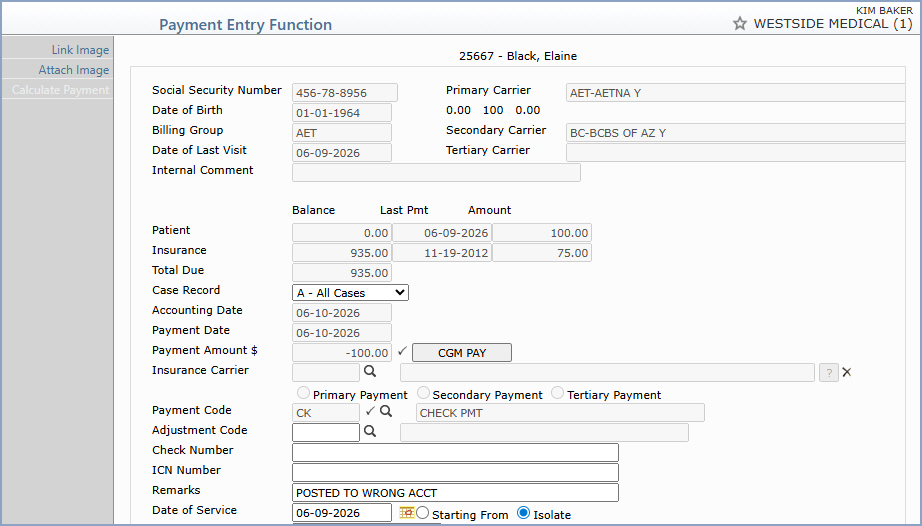
Click Save once you have completed these fields
to proceed to the Payment allocation screen, otherwise click Cancel
to exit this function.
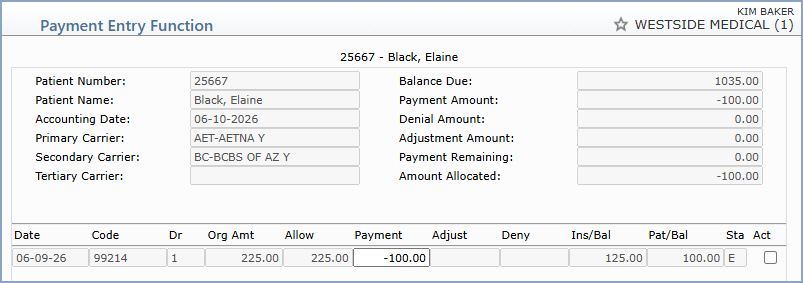
If there are multiple line items, select the correct one and type in the
negative payment amount to be applied in the Payment field. Click Save
once the negative payment has been allocated.
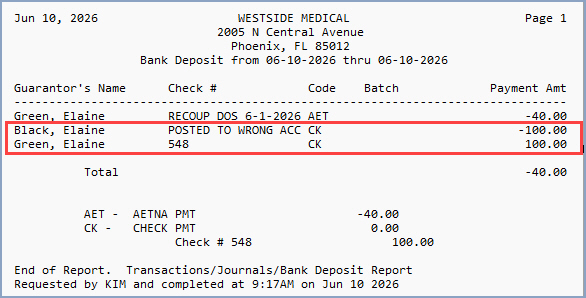
Now you can re-post the payment correctly using the current accounting
date. Select the patient account and then post the payment following normal
procedures. The negative payment and reposted payment will both show up
on the Bank Deposit report and cancel each other out.
Whether you allocate the re-posted payment or not depends on each individual
scenario. If you are going to refund the insurance carrier or research
the account, you should leave the payment unallocated so you will be able
to apply the refund to it at a later time.
Posting Error
If you are correcting a posting error and end up re-posting the payment
on a different account, you should enter a Remark that provides an audit
trail (i.e. Pmt transferred from #9999 for MM-DD-YY)

