| Prompt | Response | Req | Len |
|---|---|---|---|
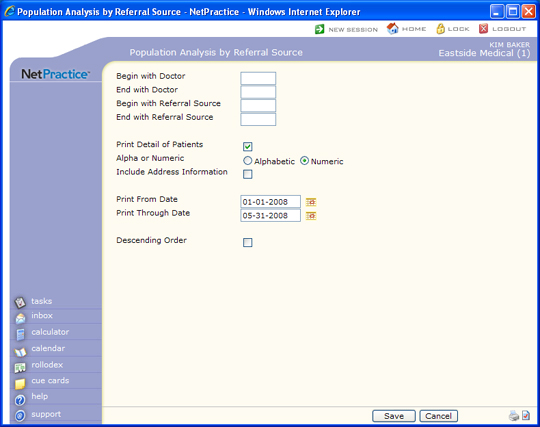
| Begin with Doctor | Type the code you want the report to begin with or leave the field blank to start with the first code in the table. | 6 | |
| End with Doctor | Type the code you want the report to end with or leave the field blank to end with the last code in the table. | 6 | |
| Begin with Referral Source | Type the code you want the report to begin with or leave the field blank to start with the first code in the table. | 6 | |
| End with Referral Source | Type the code you want the report to end with or leave the field blank to end with the last code in the table. | 6 | |
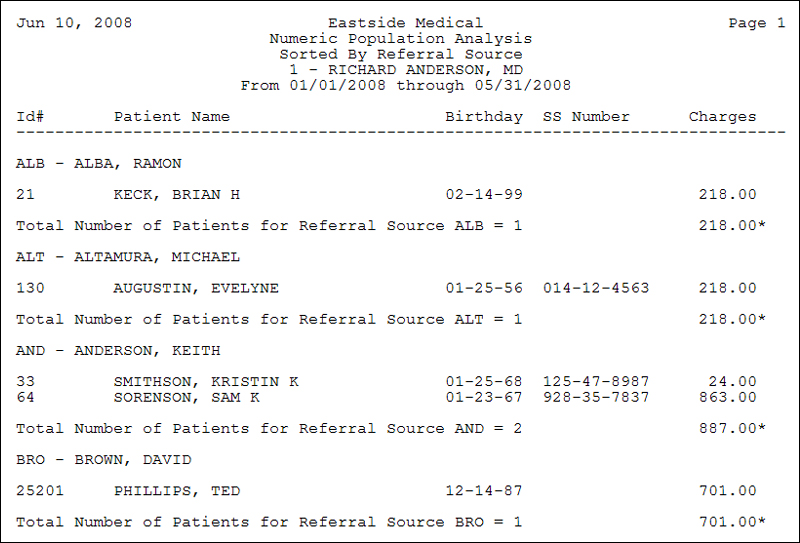
| Print Detail of Patients | If you want to include the patient's account number, name, date of birth and charges, select this check box. | 1 | |
| Alpha or Numeric | Select the sorting option to sort the patients alphabetically by last name or numerically by account number. | 1 | |
| Include Address Information | If you want to include the patient's home address information, select this check box. | 1 | |
| Print From Date | Type the date you want or click the calendar icon to select a date. This refers to the date of service on the posted charges. | 10 | |
| Print Through Date | Type the date you want or click the calendar icon to select a date. This refers to the date of service on the posted charges. | 10 | |
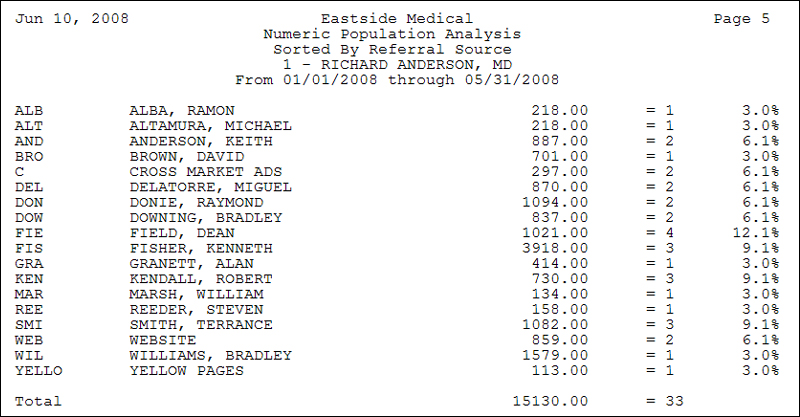
| Descending Order | If you want this report to print in descending order by each sort total amount, select this check box. Printing in descending order also includes a running total of each sort amount. |  |
1 |
Copyright and Trademark Notice. Copyright © 2019 CompuGroup Medical, Inc. CGM®, CompuGroup Medical® and the CGM logo are registered trademarks and CGM webPRACTICE™ and CGM webTOOLS™ are trademarks of CompuGroup Medical AG in the United States and/or other countries. Any rights not expressly granted herein are reserved.