

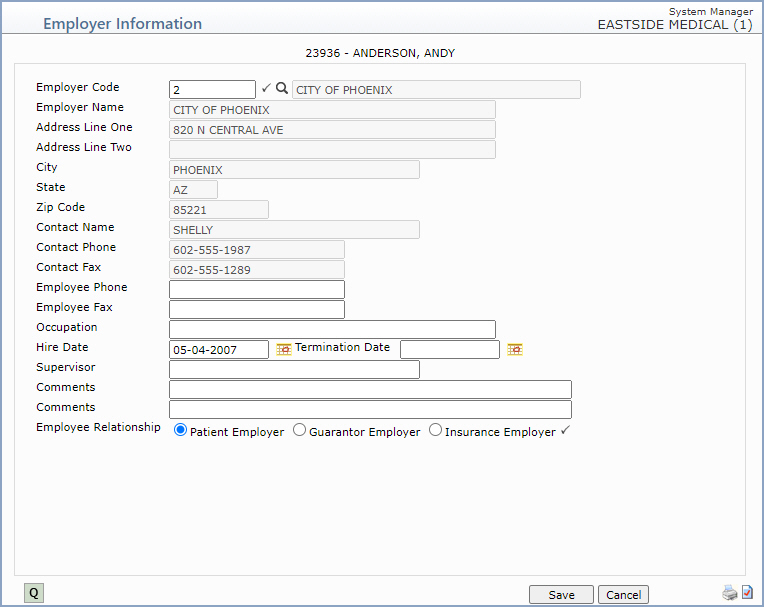
| Prompt | Response | Req | Len |
|---|---|---|---|
| Employer Code | Type the code you want or click the magnifying glass to search the Employer Code Table. |  |
8 |
| Employer Name | This field is informational only and reflects the employer's name as it is stored in the Employer Code Table. | 40 | |
| Address Line One | This field is informational only and reflects the employer's address as it is stored in the Employer Code Table. | 40 | |
| Address Line Two | This field is informational only and reflects any additional address information for the employer as it is stored in the Employer Code Table. | 40 | |
| City | This field is informational only and reflects the employer's city as it is stored in the Employer Code Table. | 30 | |
| State | This field is informational only and reflects the employer's state as it is stored in the Employer Code Table. | 3 | |
| Zip Code | This field is informational only and reflects the employer's zip code as it is stored in the Employer Code Table. | 10 | |
| Contact Name | This field is informational only and reflects the contact name for the employer as it is stored in the Employer Code Table. | 30 | |
| Contact Phone | This field is informational only and reflects the phone number for the contact person for the employer as it is stored in the Employer Code Table. | 20 | |
| Contact Fax | This field is informational only and reflects the fax number for the contact person for the employer as it is stored in the Employer Code Table. | 20 | |
| Employee Phone | Type the employee's work telephone number and extension. | 20 | |
| Employee Fax | Type the employee's work fax number. | 20 | |
| Occupation | Type the employee's occupation. | 40 | |
| Hire Date | Type the date the employee began working for this employer or click the calendar icon to select a date. | 10 | |
| Termination Date | Type the date the employee was terminated from this employer, if applicable, or click the calendar icon to select a date. | 10 | |
| Supervisor | Type the name of the employee's supervisor. | 30 | |
| Comments | Type any applicable comment for this employer record. | 50 | |
| Comments | Type any additional applicable comment for this employer record. | 50 | |
| Employee Relationship | Select the option to indicate whether this is the Patient Employer, the Guarantor Employer or the Insurance Employer. Patient Employer is selected by default. | |
1 |
Copyright and Trademark Notice. Copyright © 2019 CompuGroup Medical, Inc. CGM®, CompuGroup Medical® and the CGM logo are registered trademarks and CGM webPRACTICE™ and CGM webTOOLS™ are trademarks of CompuGroup Medical AG in the United States and/or other countries. Any rights not expressly granted herein are reserved.
