
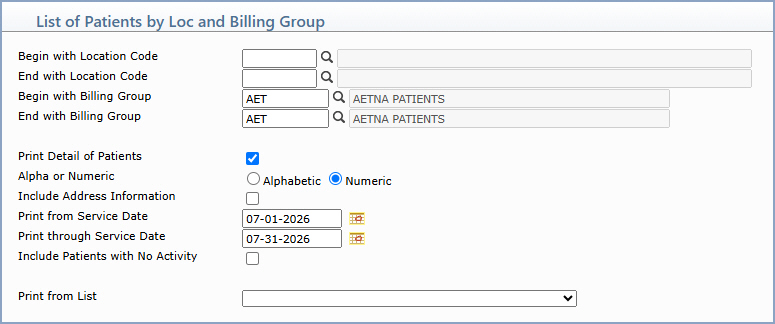
| Prompt | Response | Req | Len |
|---|---|---|---|
| Begin with Location Code | Type the code you want to begin with, or leave the field blank to start with the first code in the table. | 5 | |
| End with Location Code | Type the code you want to end with, or leave the field blank to end with the last code in the table. | 5 | |
| Begin with Billing Group | Type the code you want to begin with, or leave the field blank to start with the first code in the table. | 6 | |
| End with Billing Group | Type the code you want to end with or leave the field blank to end with the last code in the table. | 6 | |
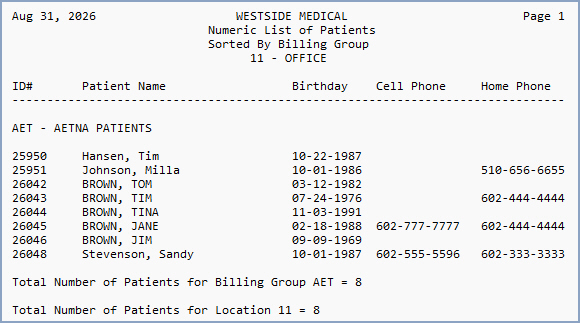
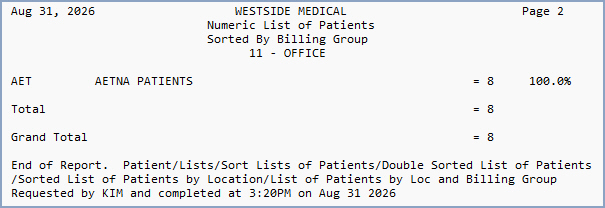
| Print Detail of Patients | If you want to print the individual detail of patients (accounts), select this check box. If you do not select to print the detail of patients, a summary of the total number of patients per code and the percentage of total patients per code will be printed. | 1 | |
| Alpha or Numeric | If you selected to print detail of patients, select the sorting option you want. | 1 | |
| Include Address Information | If you selected to print detail of patients and you want to print the patient's address information, select this check box. | 1 | |
| Print from Service Date | Type the service date you want to begin with or click the calendar icon to select a date. Accounts with charges posted within the date range are included. This field defaults to one year prior to the current day. | 10 | |
| Print through Service Date | Type the service date you want to end with or click the calendar icon to select a date. | 10 | |
| Include Patients with No Activity | If you want to include patient accounts that have not had any activity, select this check box. | 1 | |
| Print from List | If you want to print this report based off of a DMS List, select the DMS list from the DMS Lists list box. | 20 |
Copyright and Trademark Notice. Copyright © 2019 CompuGroup Medical, Inc. CGM®, CompuGroup Medical® and the CGM logo are registered trademarks and CGM webPRACTICE™ and CGM webTOOLS™ are trademarks of CompuGroup Medical AG in the United States and/or other countries. Any rights not expressly granted herein are reserved.
