5010 Submitter ID Rules

With the 5010 Submitter ID Rules function, you can set up rules to send a different Submitter ID on a 5010 electronic claim than the default Submitter ID. The Submitter ID is generally categorized by electronic form type (for example, 30 = Medicare, 31 = Medicaid, 32 = Blue Cross), but there can also be different Submitter IDs by carrier within the same form type and even by doctor or location. Any rule set up in this function overrides the default Submitter ID. The Submitter ID sent on the claim is placed in Loop 1000A Segment NM109.

For Self-Hosted clients with a Direct Connection, the default Submitter ID is stored in the Application Sender's Code (GS02 or Loop 1000A NM109) field of the Electronic Direct Connect Claims Integration function. For all other clients (whose claims are sent through CGM eMEDIX), the default Submitter ID is managed automatically in the background by CGM webPRACTICE and CGM eMEDIX.

NOTE: If you have customizations to your Submitter IDs, contact CGM customer service before making changes. Your claims will continue to go as they have been until CGM assists you with the necessary setup.

5010 Submitter ID Rules Screen

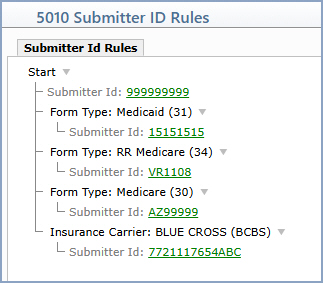
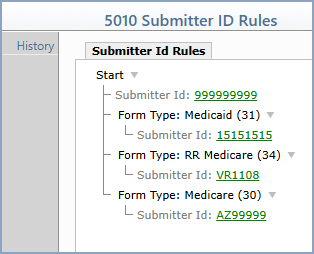
When you access this function, the 5010 Submitter ID Rules screen opens displaying the Submitter Id Rules 'tree' for the current database. The tree is set up with the Submitter Id entry directly under the Start drop-down menu. This entry represents the default Submitter ID for your database, drawn from whichever source applies to your client type. Any additional rules display below the default entry.


Click the Submitter ID link if you need to override the default Submitter ID for all claims (most often used by new clients who need to set up their own initial Submitter ID rather than pulling the value from the default source).

Adding a New Rule

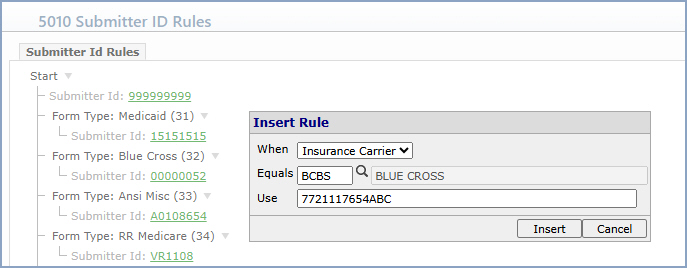
Click Start, and then click New Rule Below. The Insert Rule dialog opens.


Data Field Information
Prompt Response Req
When Select the criteria the rule should match against. Available options include Insurance Carrier, Insurance Form Number, and Insurance Plan Code.
Equals Type or select the value that the criteria selected in the When field must equal for the rule to apply (for example, a specific insurance carrier code or insurance form number).
Use Type the Submitter ID that should be sent in Loop 1000A Segment NM109 on 5010 claims that match this rule.

Click Insert to add the rule to the tree, and then click Save on the 5010 Submitter ID Rules screen to save the changes.


Notes