
| Prompt | Response | Req | Len |
|---|---|---|---|
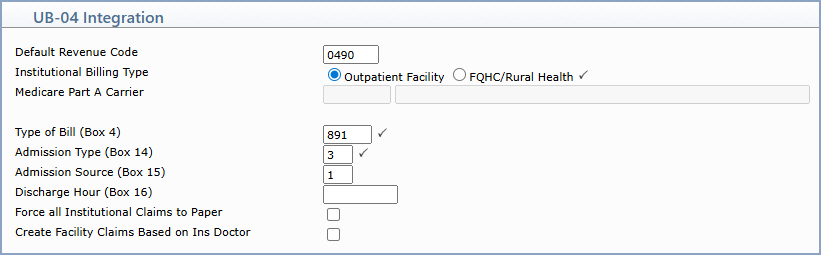
| Default Revenue Code | Type the default Revenue Code to use on Institutional claims when no Revenue Code is specified at the procedure level. Four-digit Revenue Codes are required on all Institutional claims; if you enter a Revenue Code that is less than four digits, an exception will be reported on the Print Exception Report. | 4 | |
| Institutional Billing Type | Select Outpatient Facility or FQHC/Rural Health to indicate the billing type for the database. If FQHC/Rural Health is selected, the UB Billing field on the Maintain Type of Service Codes function (Tables > Type of Service Table) must be selected for each Type of Service code that can bill UBs. |  |
1 |
| Medicare Part A Carrier | Type the insurance carrier code for the Medicare Part A carrier used for Institutional claims. The carrier name displays to the right of the field. | 10 | |
| Type of Bill (Box 4) | Type the default Type of Bill code that prints in Box 4 of the UB-04 claim form. | |
3 |
| Admission Type (Box 14) | Type the default Admission Type code that prints in Box 14 of the UB-04 claim form. | |
1 |
| Admission Source (Box 15) | Type the default Admission Source code that prints in Box 15 of the UB-04 claim form. | 1 | |
| Discharge Hour (Box 16) | Type the default Discharge Hour value that prints in Box 16 of the UB-04 claim form. | 2 | |
| Force all Institutional Claims to Paper | Select this check box to force every Institutional claim to generate as a paper claim instead of an electronic claim, regardless of the carrier's claim filing format. | ||
| Create Facility Claims Based on Ins Doctor | Select this check box if Facility claims should be generated based on the Insurance Doctor on each encounter rather than the Performing Doctor. Facility claims can be categorized as either Institutional or Professional. |
Copyright and Trademark Notice. Copyright © 2019 CompuGroup Medical, Inc. CGM®, CompuGroup Medical® and the CGM logo are registered trademarks and CGM webPRACTICE™ and CGM webTOOLS™ are trademarks of CompuGroup Medical AG in the United States and/or other countries. Any rights not expressly granted herein are reserved.
