
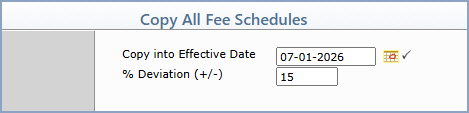
| Prompt | Response | Req | Len |
|---|---|---|---|
| Copy into Effective Date | Type the new effective date you want to create or click the calendar icon to select a date. This field does not default to the current date. |  |
10 |
| % Deviation (+/-) | Type the percentage amount to increase or decrease the allowed amounts of the copied fee schedules. For example, 5.2 would equate to a 5.2% increase, -5.2 would mean a 5.2% decrease. | 5 |
Copyright and Trademark Notice. Copyright © 2019 CompuGroup Medical, Inc. CGM®, CompuGroup Medical® and the CGM logo are registered trademarks and CGM webPRACTICE™ and CGM webTOOLS™ are trademarks of CompuGroup Medical AG in the United States and/or other countries. Any rights not expressly granted herein are reserved.
