
| Prompt | Response | Req | Len |
|---|---|---|---|
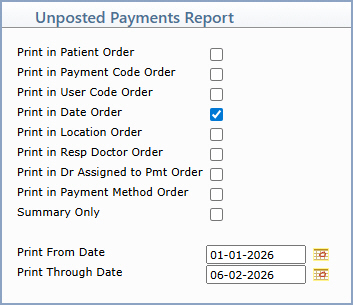
| Print in Patient Order | If you want to print the report in patient order, select this check box. | 1 | |
| Print in Payment Code Order | If you want to print the report in payment code order, select this check box. | 1 | |
| Print in User Code Order | If you want to print the report in user code order, select this check box. | 1 | |
| Print in Date Order | If you want to print the report in payment date order, select this check box. | 1 | |
| Print in Location Order | If you want to print the report in location order, select this check box. | 1 | |
| Print in Resp Doctor Order | If you want to print the report in responsible doctor order, select this check box. | 1 | |
| Print in Dr Assigned to Pmt Order | If you want to print the report in order of the doctor assigned to the payment, select this check box. | 1 | |
| Print in Payment Method Order | If you want to print the report in payment method order, select this check box. | 1 | |
| Summary Only | If you only want to print a summary, select this check box. | 1 | |
| Print From Date | Type the start date for the date range you want included on the report, or click the calendar icon to select a date. | 10 | |
| Print Through Date | Type the end date for the date range you want included on the report, or click the calendar icon to select a date. | 10 |
Copyright and Trademark Notice. Copyright © 2019 CompuGroup Medical, Inc. CGM®, CompuGroup Medical® and the CGM logo are registered trademarks and CGM webPRACTICE™ and CGM webTOOLS™ are trademarks of CompuGroup Medical AG in the United States and/or other countries. Any rights not expressly granted herein are reserved.
