Payment Actions
In the bottom lower part of your screen you will notice a drop down
box with the word Action: next to it. There are several action
functions that can be performed while in the Payment Entry Function. These
functions are performed by clicking the box in the Action (Act) column
for each procedure(s).
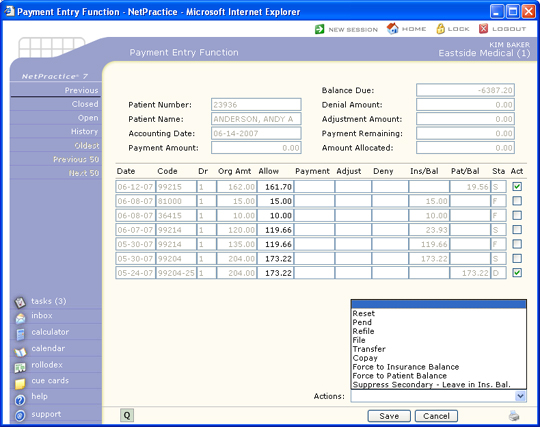
Once you have clicked on a line item, the Action drop down box will
become active and you may select the desired action. You can only do one
type of action at a time, but may click on several line items for that
action. Each of these functions will occur even if the payment is not
saved. NOTE: These functions will not display if there has
never been an insurance carrier on the account.
The Payment Actions were designed to be transparent during the payment
entry process to minimize interruptions to the normal workflow. If a payment
and adjustment are posted together during payment entry and a Payment
Action is also performed, only one notation for the Payment Action is
made in the patient's Insurance Ledger.
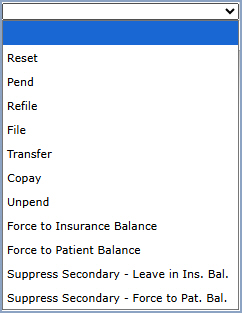
The following actions are available:
- Reset - Reverses a Payment Action and the corresponding
notation in the patient's Insurance Ledger. It is also used to clear
a line item that you mistakenly applied a payment, adjustment, or
denial towards. Select the Act check box for the transaction in the
Act column, then select Reset from the Action list. The screen refreshes
and any line items checked will have their payment, adjustment, or
denial amounts removed, and the balances at the top of the screen
are adjusted accordingly. Reset will only work on the active line
items within the current Payment Entry screen, prior to saving the
payment.
- Pend - Holds a charge so it continues to show up on insurance
aging reports until further action by the insurance carrier is taken
(i.e., payment or denial). Click the line items you want pended, then
select Pend from the Action list. A dialog box displays with the carrier
defaulted, a drop-down of all other carriers on file, and a reason
box for a free-text explanation. You may want to pend a procedure
if insurance has requested additional information. When you run Create
Delinquent Insurance (Billing, Insurance Billing Functions, Delinquent
Insurance Menu) you can opt to have pended charges suppressed from
creating a delinquent claim. You can also run a report of all charges
currently in a pend status see Pend
Reports (Billing, Insurance Billing Functions, Insurance Management
Reports).
- Refile - Refiles the selected charge(s) to the patient's
insurance carrier. Click the line items you want refiled, then select
Refile from the Action list. A dialog box displays with the carrier
defaulted, a drop-down of all other carriers on file, and a reason
box for a free-text explanation. A 'Refiled' code (*) is placed in
the insurance status field and the transaction is immediately placed
into the insurance submission file.
- File - Files the selected charge(s) to the patient's insurance
carrier. Click the line items you want filed, then select File from
the Action list. A dialog box displays with the carrier defaulted,
a drop-down of all other carriers on file, and a reason box for a
free-text explanation. If the charge passes the edits for filing,
an 'E' (electronic) or 'F' (paper) is placed in the insurance status
field and the transaction is immediately placed into the electronic
or paper file. The File and Refile Actions cannot be used if the selected
procedure(s) contain the NF modifier. A warning message displays: The
File and Refile Actions are not permitted because an NF modifier has been
attached to the charge(s).
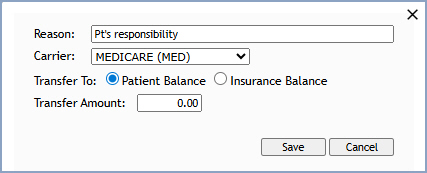
- Transfer - Transfers a balance between the insurance and
patient columns. Click the line items you want transferred, then select
Transfer from the Action list. The dialog box below displays with
the carrier defaulted, a drop-down of all other carriers on file,
a reason box for a free-text explanation, a Transfer To option (Patient
Balance or Insurance Balance), and a Transfer Amount.
If you have selected multiple line items, you will have to select whether
or not you want the balances transferred to patient responsibility
or to insurance liability. You can select the desired outcome by clicking
the appropriate radio button next to your selection. All balances
will be transferred to the column you selected whether they are credits,
debits, charges, payments, or adjustments. If you select only one
line item, you must enter the amount you would like to remain in patient
balance. If you enter an amount that is less than the amount owing
on the line item, then the remainder will be put in the insurance
balance.
You must be aware that when a patient balance is transferred to insurance
CGM webPRACTICE does not automatically bill the insurance carrier.
In order to bill the insurance you must file the procedures either
through the re-file or file function on this screen, or through the
insurance on demand. This function can be helpful in correcting insurance
billing errors (i.e., the insurance carrier has only made a partial
payment on a claim and you want to re-submit the claim entering a
transfer after posting the payment will keep the amount in the insurance
balance).
- Co-pay - Causes the co-payment amount to remain in the Patient
Balance column when the insurance is billed (normally done when the
patient didn't make their copayment), so CGM webPRACTICE can generate
a statement for the unpaid co-payment. Click the line item, then select
Copay from the Action list. A dialog box displays with the carrier
defaulted, a drop-down of all other carriers on file, and an amount
box defaulting to the co-payment amount stored in the patient's primary
insurance record. Accept the amount with Tab, type a corrected amount,
or type the corrected amount followed by an asterisk (*) to post a
different amount and also update the co-payment amount in the patient's
Insurance Information (e.g. 10.00*).
- Unpend - Reverses a Pend. Click the line item(s) you want
to unpend, then select Unpend from the Action list. The pended status
is removed so the charge(s) are no longer held back from delinquent
insurance processing.
- Force to Insurance Balance - Overrides the automatic shifting
of balances and moves the balance for the selected line item(s) into
the insurance balance column.
- Force to Patient Balance - Overrides the automatic shifting
of balances and forces the balance for the selected line item(s) into
the patient balance column even when the patient has a secondary carrier.
- Suppress Secondary - Leave in Ins. Bal. - Suppresses the
generation of a secondary claim and leaves any balance remaining in
the insurance balance column.
- Suppress Secondary - Force to Pat. Bal. - Suppresses the
generation of a secondary claim and forces any balance remaining into
the patient balance column. A notation of Transfer from Ins, Suppress
Secondary. is made in the patient's Insurance Ledger for the transaction.

