
If, in the Payment Entry screen, you typed a payment code that is not
assigned as either an Insurance Payment or a Co-Payment, it is considered
a Personal Payment. All personal payments are deducted from the patient
balance.
You can review how your payment codes are set up in Review
a Payment Code or edit them in Maintain
Payment Codes.
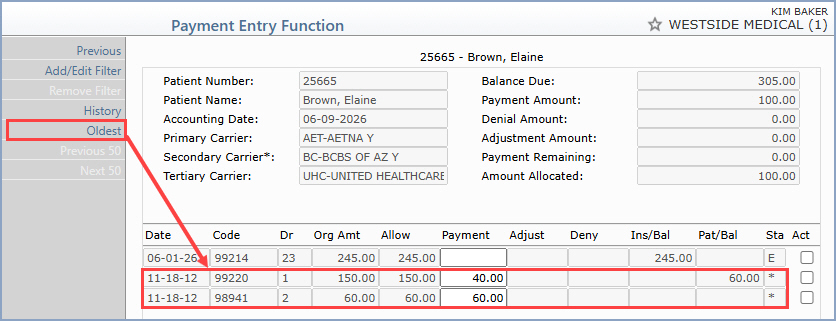
If you are posting a personal payment, then you can pay based on the oldest
transaction on the account (based on Accounting Date) by clicking Oldest
in the Action Column. This is helpful if a patient is making payments
on their account and you want to apply the payment toward the oldest balance.
The screen will refresh with applied amounts in the Payment fields and
the payment amounts subtracted from the patient balances. It will apply
as much of the payment it can to transactions with a patient balance and
it will skip any transactions that have negative balances.
Note: The Oldest button applies payments only to the oldest transactions currently available on the Allocation screen(s). Example: If you have a filter applied, Oldest applies payments only to the filtered transactions. If more than 50 transactions are shown (across multiple pages), Oldest allocates payments to the oldest transactions across those pages.
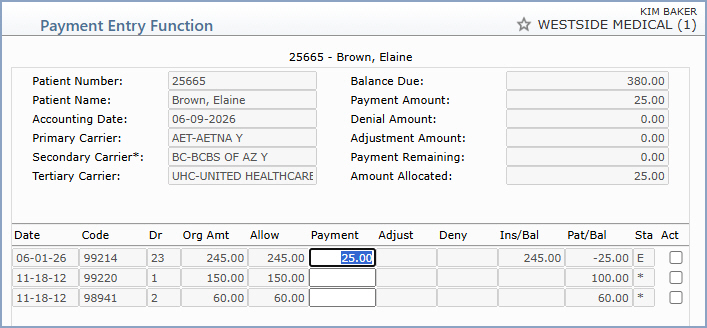
If you want to apply the personal payment to a particular line item, you
will need to clear the payment field that is defaulted.
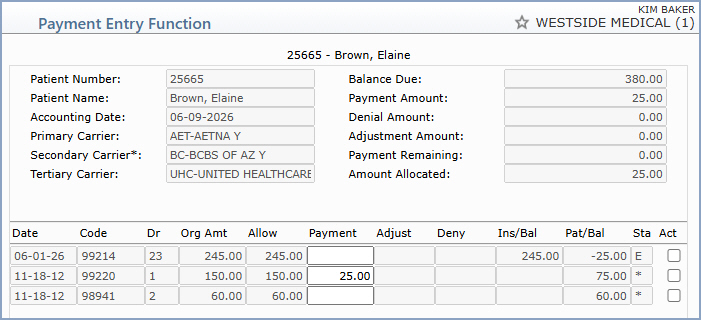
Then click in the payment field of the line item you want to pay. Accept the amount defaulted or enter the amount of the payment and press tab. Since the system knows this is a personal payment, the adjustment field and denial field will be skipped and the pointer will drop to the payment field of the next charge. The patient balance remaining will be reduced by the amount of the payment.
If you do not allocate the entire payment entered, you will receive a warning
message and asked to confirm if you want to post the payment.
Copyright and Trademark Notice. Copyright © 2019 CompuGroup Medical, Inc. CGM®, CompuGroup Medical® and the CGM logo are registered trademarks and CGM webPRACTICE™ and CGM webTOOLS™ are trademarks of CompuGroup Medical AG in the United States and/or other countries. Any rights not expressly granted herein are reserved.
