
| Prompt | Response | Req | Len |
|---|---|---|---|
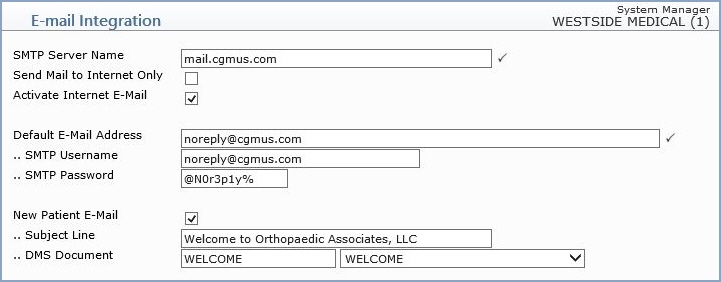
| SMTP Server Name | Type the SMTP Server name. Consult your IT or Network Administrator, if necessary, to obtain this information. |  |
40 |
| Send Mail to Internet Only | If you want all outgoing e-mail messages to only be sent to Internet e-mail addresses and not through CGM webPRACTICE, select this check box. | 1 | |
| Activate Internet E-Mail | If you ever experience any problems with your Internet e-mail and if you selected to send E-mail messages to Internet E-mail addresses only, you can temporarily inactivate this function. While inactive, your outgoing e-mail messages will be sent to the user's CGM webPRACTICE e-mail. | 1 | |
| Default E-Mail Address | Type the default e-mail address to be used by CGM webPRACTICE when sending system e-mail messages. This is the 'From' address that is used on the New Patient e-mails. | |
30 |
| .. SMTP Username | Type the SMTP Username. | 12 | |
| .. SMTP Password | Type the SMTP Password. | 12 | |
| New Patient E-Mail | If you want to send an e-mail message automatically to
every New Patient, select this check box. The e-mail message will be sent after a
patient account has been registered in Patient, Patient Registration or
quick-registered through Schedule, Enter Patient Appointments. The e-mail message
must be created within a DMS or Rich Text document. CGM webPRACTICE will send the
e-mail to the Guarantor's e-mail address and if one isn't entered, it will be sent
to the Patient's e-mail address. An image will also be created for every e-mail
message sent and placed in the E-mail folder located in Image Management
(Patient, Change Patient Data, Images or System, Image Management, View
Images). NOTE: If a Rich Text document is used, images cannot be inserted into the document as they will not transfer through the e-mail. |
1 | |
| .. Subject Line | Type the text you want contained in the e-mail subject line. | 40 | |
| .. DMS Document | Select the DMS or Rich Text Document containing the New Patient e-mail message. Only one document may be selected for this function. | 20 |
Copyright and Trademark Notice. Copyright © 2019 CompuGroup Medical, Inc. CGM®, CompuGroup Medical® and the CGM logo are registered trademarks and CGM webPRACTICE™ and CGM webTOOLS™ are trademarks of CompuGroup Medical AG in the United States and/or other countries. Any rights not expressly granted herein are reserved.
