

Interface Notifications

With the Interface Notifications function you can review and work the table codes (such as Department, Referral Source, and Insurance Carrier codes) that were received through an inbound interface and need your attention. This function is for inbound interface clients only.

NOTE: This function only displays on the Tables menu when notifications exist that need to be worked for the database you are logged into.

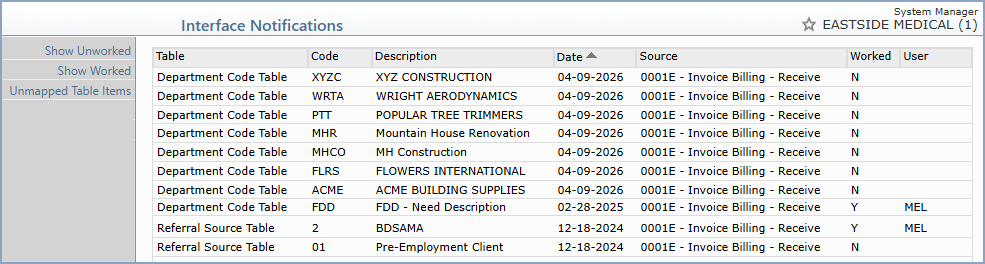
Upon accessing this function, the Interface Notifications Summary screen displays a list of the table codes that need to be worked.


The Summary screen contains the following columns:

Table - The table that the code belongs to (for example, Department Code Table or Referral Source Table).

Code - The table code received through the interface.

Description - The description received for the code.

Date - The date the code was received through the interface.

Source - The interface connection that sent the code.

Worked - Indicates whether the code has been worked yet (Y or N).

User - The User Code of the staff member who worked the code.

Working a Code
To review or edit a code, click anywhere in the row for the table code. The standard Maintain screen for that table (for example, Maintain Referral Source Codes or Maintain Insurance Carriers) displays and shows the data received via the interface for that code. After you have made any necessary edits, click Save and then Cancel to return to the main Interface Notifications Summary screen. If no edits are necessary, click Cancel. The table code is marked as Worked, your User Code is stored to indicate you worked it, and the code no longer displays in the Unworked list.

Action Column Functions
The Action Column buttons toggle the display between Show All, Show Worked, and Show Unworked, depending on which view is currently displayed.

Unmapped Table Items - Click this button to display any table items you need to map for the interface specific to the database you are currently logged into. If there aren't any table items to be mapped, the button will not display.

Unmapped Table Items
When you click Unmapped Table Items, the Interface Notifications - Unmapped Table Items screen displays a list of the codes that were received through the interface but do not yet have a matching code in your table.


This screen contains the following columns:

Interface - The interface connection code.

Name - The name of the interface connection.

Database - The database the item was received for.

Table - The table the item belongs to.

Unmapped Code - The code received through the interface that has no matching code in your table.

Patient Last Name and Patient First Name - The patient associated with the unmapped item, when applicable.

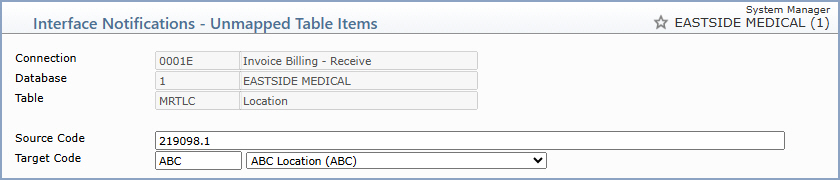
To map an item, click anywhere in the row. The mapping screen displays the interface information (Connection, Database, and Table) along with the code to be mapped.


Data Field Information
Prompt Response Req Len
Source Code The code received through the interface that needs to be mapped. This field is display only.    
Target Code Type the code you want or select from the list to map the Source Code to an existing code in your table. Click Save to store the mapping.
