

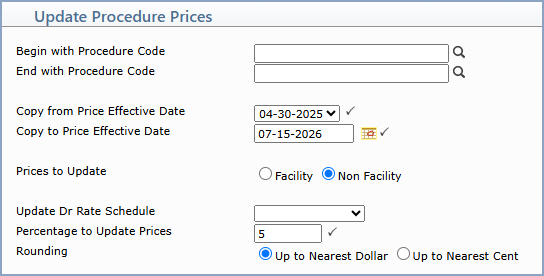
| Prompt | Response | Req | Len |
|---|---|---|---|
| Begin with Procedure Code | Type the code you want to begin with, click the magnifying glass to search the table or leave the field blank to start with the first item in the table. | 25 | |
| End with Procedure Code | Type the code you want to end with, click the magnifying glass to search the table or leave the field blank to end with the last item in the table. | 25 | |
| Copy from Price Effective Date | Select the existing effective date for the Procedure Code Prices. |  |
10 |
| Copy to Price Effective Date | Type the new effective date you want to create or click the calendar icon to select a date or accept the default of the current date. | |
10 |
| Prices to Update | Select which amounts you want to update in the Procedure Code Table. | 1 | |
| Update Dr Rate Schedule | Select the rate schedule (A-E) to update the rate schedule prices in the Procedure Code Table or leave this field blank to update all the Normal Prices in the Procedure Code Table. | 1 | |
| Percentage to Update Prices | Type a positive or negative percentage in whole number or a decimal format, but do not include the % sign. For example, type 50 to increase the price by 50%, 2.5 to increase the price by 2.5% or -50 to decrease the price by 50%. | |
6 |
| Rounding | Select the rounding option you want. |
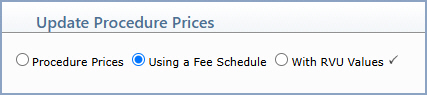
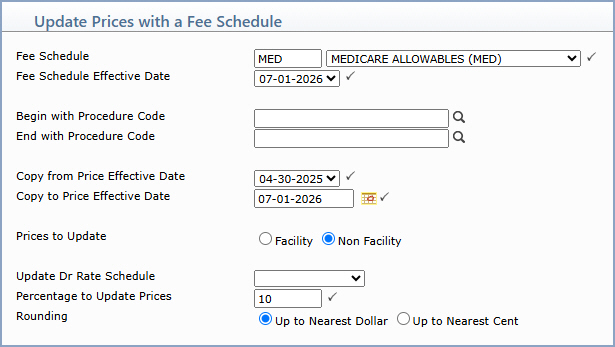
| Prompt | Response | Req | Len |
|---|---|---|---|
| Fee Schedule | Type the code you want or select from the Fee Schedule list. | |
1 |
| Fee Schedule Effective Date | Select the existing effective date for the Fee Schedule. | |
10 |
| Begin with Procedure Code | Type the code you want to begin with, click the magnifying glass to search the table or leave the field blank to start with the first item in the table. | 25 | |
| End with Procedure Code | Type the code you want to end with, click the magnifying glass to search the table or leave the field blank to end with the last item in the table. | 25 | |
| Copy from Price Effective Date | Select the existing effective date for the Procedure Code Prices. | |
10 |
| Copy to Price Effective Date | Type the new effective date you want to create or click the calendar icon to select a date or accept the default of the current date. | |
10 |
| Prices to Update | Select which amounts you want to update in the Procedure Code Table. | 1 | |
| Update Dr Rate Schedule | Select the rate schedule (A-E) to update the rate schedule prices in the Procedure Code Table or leave this field blank to update all the Normal Prices in the Procedure Code Table. | 1 | |
| Percentage to Update Prices | Type a positive or negative percentage in whole number or a decimal format, but do not include the % sign. For example, type 50 to increase the price by 50%, 2.5 to increase the price by 2.5% or -50 to decrease the price by 50%. | |
6 |
| Rounding | Select the rounding option you want. |
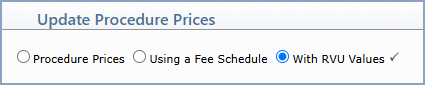
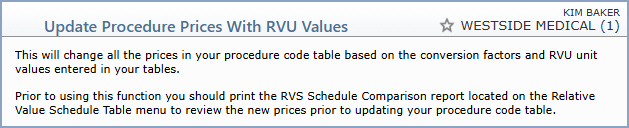
| Prompt | Response | Req | Len |
|---|---|---|---|
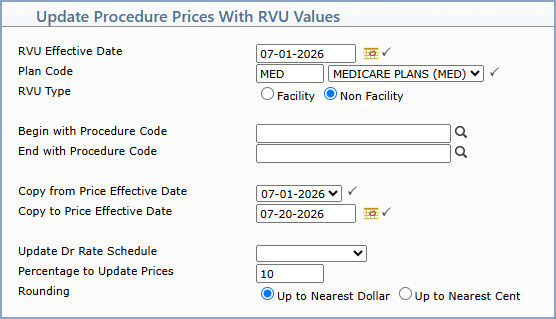
| RVU Effective Date | Type the effective date of the RVS schedule you want or click the calendar icon to select a date. | |
10 |
| Plan Code | Type the code you want or select from the Plan Code list. The plan code contains the conversion amounts for the prices. | 5 | |
| RVU Type | Select the RVU type option you want to use when updating prices. | 1 | |
| Begin with Procedure Code | Type the code you want to begin with, click the magnifying glass to search the table or leave the field blank to start with the first item in the table. | 25 | |
| End with Procedure Code | Type the code you want to end with, click the magnifying glass to search the table or leave the field blank to end with the last item in the table. | 25 | |
| Copy from Price Effective Date | Select the existing effective date for the Procedure Code Prices. | |
10 |
| Copy to Price Effective Date | Type the new effective date you want to create or click the calendar icon to select a date or accept the default of the current date. | |
10 |
| Update Dr Rate Schedule | Select the rate schedule (A-E) to update the rate schedule prices in the Procedure Code Table or leave this field blank to update all the Normal Prices in the Procedure Code Table. | 1 | |
| Percentage to Update Prices | Type a positive or negative percentage in whole number or a decimal format, but do not include the % sign. For example, type 50 to increase the price by 50%, 2.5 to increase the price by 2.5% or -50 to decrease the price by 50%. | 6 | |
| Rounding | Select the rounding option you want. |
Copyright and Trademark Notice. Copyright © 2019 CompuGroup Medical, Inc. CGM®, CompuGroup Medical® and the CGM logo are registered trademarks and CGM webPRACTICE™ and CGM webTOOLS™ are trademarks of CompuGroup Medical AG in the United States and/or other countries. Any rights not expressly granted herein are reserved.
